Choosing the right artwork file can make a significant difference to the quality of a printed T-shirt. Even a well-designed graphic can look blurry, pixelated or poorly positioned if it is supplied in the wrong format.
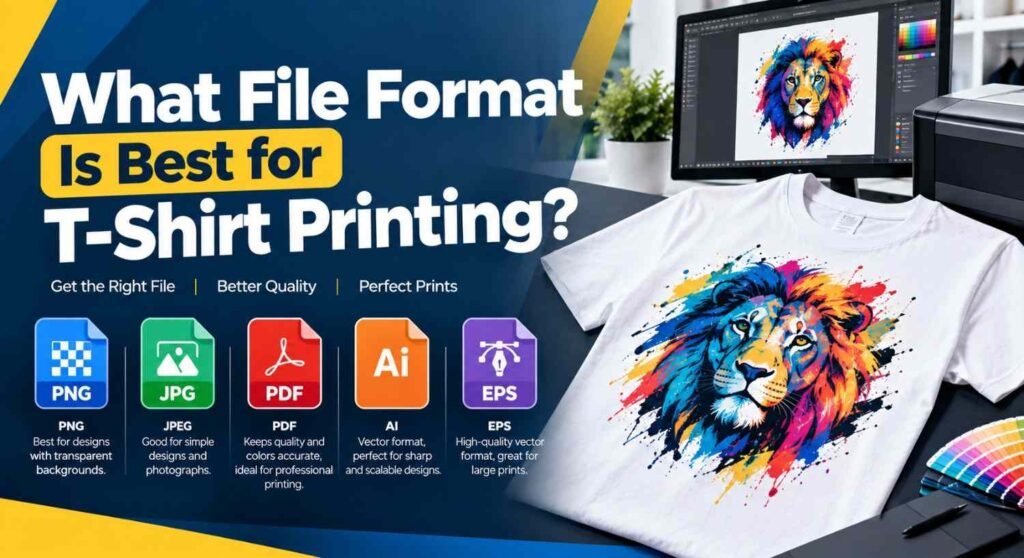
So, what is the best File Format for T-Shirt Printing? In most cases, a high-resolution vector file such as AI, EPS or PDF is the preferred choice for professional printing. However, high-resolution PNG files can also be suitable, particularly for designs with transparency, photographs or detailed artwork.
The right format ultimately depends on the type of artwork, printing method and how the design will be reproduced on the garment.
Why Does the File Format Matter for T-Shirt Printing?
The file format determines how your artwork stores information such as shapes, colours, transparency and image resolution. This directly affects how accurately the design can be prepared for printing.
A low-quality image may look perfectly acceptable on a phone or computer screen but become visibly pixelated when enlarged for a T-shirt.
A suitable print file should generally provide:
- High image quality
- Correct dimensions
- Appropriate colour information
- Clean edges and details
- Transparency where required
- Fonts that will not change during production
- Sufficient resolution for the intended print size
For professional garment printing, supplying the original artwork rather than a screenshot or compressed social media image is usually the safest approach.
What Is the Best File Format for T-Shirt Printing?
For most professional printing projects, vector artwork in AI, EPS or print-ready PDF format is the preferred option.
Vector graphics are created using mathematical paths rather than a fixed grid of pixels. This means logos, illustrations, lettering and other suitable artwork can generally be resized without losing edge quality.
Which Vector Formats Are Commonly Used?
AI (Adobe Illustrator)
AI is Adobe Illustrator’s native format and is widely used for professional artwork. It is particularly useful when a printer needs to make minor adjustments to a design before production.
EPS (Encapsulated PostScript)
EPS is a long-established format for professional printing. It can preserve vector paths and is commonly accepted for logos, illustrations and typography.
PDF (Portable Document Format)
A properly prepared print PDF can be an excellent option because it can preserve vector artwork, fonts, layout and other print information in a single file.
SVG (Scalable Vector Graphics)
SVG is another vector format and is widely used for digital graphics. However, not every garment printer accepts SVG directly, so it is worth checking before sending your artwork.
Why Are Vector Files Often Preferred?
A vector design can be scaled from a small logo to a large chest or back print while maintaining smooth edges.
This is especially useful for:
- Business logos
- Text-based designs
- Line illustrations
- Simple icons
- Geometric artwork
- Brand graphics
Vector artwork is not automatically better for every type of design, though. Photographs and highly detailed raster artwork are naturally pixel-based and may be better supplied as high-resolution images.
How Do Vector Files Improve Print Quality?
Vector files help improve t-shirt print quality because they use mathematical paths rather than fixed pixels. This allows logos, text and artwork to be resized without becoming blurry or pixelated. Whether you are printing a small design on a t-shirt or a large graphic for promotional clothing, vector artwork can maintain sharp edges, clean details and consistent quality. This makes formats such as AI, EPS and SVG particularly useful for professional t-shirt printing.
Can You Use a PNG File for T-Shirt Printing?
Yes. A PNG can be a suitable File Format for T-Shirt Printing, especially when the artwork requires a transparent background.
PNG files can support transparency, making them useful for designs where you do not want a rectangular background around the artwork.
For example, a design containing a colourful illustration with no background can be supplied as a transparent PNG.
However, PNG is a raster format, meaning the image is made from pixels. If the file is too small, enlarging it can result in blurry edges and visible pixelation.
What Resolution Should a PNG T-Shirt Design Have?
For many print applications, 300 DPI at the final physical print size is a useful target for raster artwork.
For example, if your artwork will be printed at 10 inches wide, an image around 3,000 pixels wide at the final artwork dimensions would provide approximately 300 pixels per inch.
The important point is that DPI should be considered together with the actual pixel dimensions and intended print size. Simply changing the DPI setting in image-editing software does not create additional image detail.
When Should You Use a JPG for T-Shirt Printing?
JPG files can work for some T-shirt designs, particularly photographs and detailed raster images. However, JPG uses lossy compression, which can reduce image quality.
Repeatedly saving and compressing a JPG can introduce unwanted artefacts around text, edges and fine details.
A high-resolution JPG may therefore be acceptable when:
- The artwork is photographic
- The image has no need for transparency
- The file has sufficient pixel dimensions
- Compression has not noticeably damaged the artwork
For logos, text and illustrations, a vector file is usually more practical.
What Colour Format Should Your Print File Use?
File format is only one part of preparing artwork. Colour settings can also affect the final result.
Screens generally display colours using RGB (Red, Green, Blue), while many professional print workflows use CMYK (Cyan, Magenta, Yellow and Key/Black).
The exact colour workflow depends on the printing process and equipment being used. For this reason, you should follow the printer’s artwork specifications rather than automatically converting every file to CMYK.
Why Can Printed Colours Look Different From a Screen?
A monitor produces light, whereas printed ink or toner reflects light. As a result, colours displayed on a screen cannot always be reproduced identically on fabric.
Bright neon colours, highly saturated shades and certain gradients can be particularly challenging.
If exact colour matching is important for a business logo or branded garment, ask the printer about their preferred colour profile and whether they support specific colour references.
How Should You Prepare Artwork Before Sending It?
Preparing your design correctly can prevent unnecessary delays and production problems.
Before submitting your artwork, check the following:
- Confirm the final print dimensions.
Make sure the artwork is created or supplied at the intended physical size. - Use high-resolution raster images.
If you are supplying PNG or JPG artwork, make sure it has enough pixel detail for the required print size. - Use vector artwork where appropriate.
Logos, typography and illustrations are often best supplied as AI, EPS or a suitable PDF. - Check transparency.
If your design needs a transparent background, confirm that the file actually contains transparency rather than a white background. - Outline fonts when appropriate.
Converting text to outlines can prevent font-substitution problems when a file is opened on another computer. - Check the artwork at 100% size.
Inspect the design at its intended print dimensions rather than relying only on how it looks when zoomed out. - Keep important elements away from the edges.
Allow appropriate space around text, logos and other important details. - Follow the printer’s specifications.
Different printing processes can have different requirements for colour, resolution, file types and artwork setup.
How Does the Printing Method Affect the File You Should Send?
The ideal artwork setup can vary depending on whether the garment is being produced using screen printing, direct-to-garment (DTG), direct-to-film (DTF), heat transfer or another process.
Screen Printing
Screen printing commonly works very well with clean vector artwork, particularly for designs containing solid colours and clearly defined shapes.
The artwork may need to be separated into individual colours, depending on the production method.
Direct-to-Garment Printing
DTG printing is designed for printing directly onto garments and can reproduce detailed artwork and photographic imagery.
High-resolution PNG files with transparency can be useful for this type of design, provided they meet the printer’s technical requirements.
Direct-to-Film Printing
DTF transfers can reproduce detailed and colourful artwork. High-quality transparent PNG artwork is commonly used in DTF workflows, although exact file requirements depend on the production setup.
Heat Transfer Printing
Heat-transfer methods can accommodate different types of artwork. Vector files are useful for logos and clean graphics, while high-resolution raster images may be suitable for photographic or highly detailed designs.
What Should You Avoid When Creating a T-Shirt Print File?
Not every image that looks good on a screen is ready for garment printing.
Avoid sending:
- Screenshots of your artwork
- Images downloaded from social media
- Extremely small JPG files
- Blurry photographs
- Low-resolution logos
- Files with unwanted backgrounds
- Heavily compressed images
- Artwork containing missing fonts
- Designs with unclear print dimensions
A common mistake is taking a small image from a website and simply increasing its dimensions. Enlarging a low-resolution image does not recreate the missing detail, so the final print may still appear soft or pixelated.
For professional garment printing, T-Shirt Print London can advise on artwork requirements and help ensure your supplied design is suitable for the intended production process.
How Can You Check Whether Your Artwork Is Print-Ready?
A quick pre-production check can help identify common problems before your file reaches the printer.
Open the artwork at its intended print size and inspect small text, thin lines, edges and detailed areas. Look for pixelation, unwanted backgrounds and inconsistent colours.
If the design is vector-based, zoom in closely to check that paths and shapes remain clean. If it is raster-based, check the actual pixel dimensions rather than relying solely on the file’s DPI information.
You should also confirm the intended print area, garment colour and printing method. These details can influence how the artwork needs to be prepared.
For example, artwork designed for a white T-shirt may need different preparation from artwork intended for a black or coloured garment, particularly when transparency and underbase printing are involved.
What Is the Best File Format for Different Types of T-Shirt Designs?
There is no single format that is perfect for every design. The best choice depends on the artwork itself.
| Design Type | Suitable File Formats |
| Business logo | AI, EPS, PDF |
| Text-based artwork | AI, EPS, PDF |
| Simple illustration | AI, EPS, PDF, SVG |
| Detailed illustration | AI, EPS, PDF or high-resolution PNG |
| Photograph | High-resolution JPG or PNG |
| Transparent artwork | PNG, AI, EPS or suitable PDF |
| Complex branded artwork | AI, EPS or print-ready PDF |
When several versions are available, providing the original editable vector artwork is often helpful. It gives the printer greater flexibility when preparing the design for production.
Can a Printer Fix a Low-Quality T-Shirt Design?
Sometimes, but there are limits to what can be corrected.
A printer or designer may be able to recreate a simple logo as vector artwork, remove a background or make certain technical adjustments. However, severely pixelated or heavily compressed images may not contain enough information to reproduce the original design accurately.
If the artwork is important, recreating it from the original source file is usually preferable to trying to enlarge a poor-quality copy.
What Should You Ask Before Sending Your Print File?
Before submitting artwork, ask the printer:
- Which file formats do you accept?
- Do you prefer vector artwork?
- What resolution should raster images have?
- Do you require RGB or CMYK?
- Should fonts be outlined?
- Do you need a transparent background?
- What are your maximum and minimum print dimensions?
- Do you provide artwork checking or design assistance?
These questions can save time and reduce the risk of receiving a print that does not match your expectations.
Frequently Asked Questions
What is the highest-quality file format for T-shirt printing?
For logos, typography and vector illustrations, AI, EPS and properly prepared PDF files are commonly suitable. They can preserve scalable vector artwork and provide clean edges during production.
Is PNG or PDF better for T-shirt printing?
It depends on the artwork. PDF is often preferable for vector designs, while PNG can be useful for transparent raster artwork. The printer’s specific requirements should always take priority.
Is 300 DPI enough for T-shirt printing?
300 DPI at the final physical print size is a commonly used target for high-quality raster artwork. However, the required resolution can vary depending on the printing process, artwork size and production equipment.
Can I print a T-shirt design from a JPG?
Yes, provided the JPG has sufficient resolution and acceptable image quality. High-resolution JPG files can be suitable for photographs and detailed raster artwork, although vector artwork is generally preferable for logos and text.
Should a T-shirt design have a transparent background?
If you want the garment colour to show through areas outside or within the design, transparency may be necessary. PNG files can preserve transparency, as can suitable vector artwork.
Do T-shirt printers need CMYK files?
Not necessarily. The preferred colour mode depends on the printer and production process. Some workflows may request CMYK, while others work with RGB artwork and handle colour conversion during production.
Why does my T-shirt design look blurry when printed?
Blurriness is commonly associated with insufficient image resolution, excessive enlargement or compression. A small raster image may look sharp on a phone screen but lose detail when enlarged to T-shirt size.
Can I send an AI, EPS or PDF file from a graphic designer?
Yes. These are commonly used professional formats for vector artwork. Before sending the file, check that fonts, linked images, transparency, dimensions and colour settings have been prepared according to the printer’s specifications.